Wind for Unreal

How Natsura's Wind Config sets up layered wind that travels to Unreal via wind.json, and what wind currently is and isn't in Natsura.

Wind in Natsura today means: every tree that comes out of a Simulate is rigged by default, the Wind Config node assigns wind layers to parts of the tree, and the resulting setup is carried into Unreal via wind.json alongside the USD export. There is no bespoke in-Houdini wind solver yet; the current path is Unreal-bound.

For the export node that carries this setup across, see Export Unreal Nanite Assembly; for the broader Unreal workflow, see Working with Assemblies in Unreal.

State of wind in Natsura today

What's shipped:

  • Every Natsura tree is rigged and skinned at simulate time.
  • The Wind Config node lays out which wind layers apply to which parts of the tree.
  • The Unreal export carries the wind setup across via wind.json, which the engine-side rig can read.

What is not yet on the menu:

  • A bespoke in-Houdini wind solver.
  • Vertex-animation-texture (VAT) wind.
  • Pivot-Painter-style setups.
  • Full physical wind simulation as a packaged Natsura tool.
  • Traditional pipelines (LOD-coupled wind, baked-wind workflows) as a packaged path.

If you need any of the above today, the rigged skeleton is the right entry point: you can drive a Vellum or other Houdini solver from it directly. The packaged Natsura wind solver just isn't here yet.

Why every tree is already rigged

Trees are rigged at simulate time, not after. The skeleton is generated alongside the geometry, and skin weights are transferred automatically based on which part of the skeleton each piece of geometry came from. Nothing needs to be weight-painted by hand, and everything comes out correctly skinned. The same machinery is available to custom decorations.

This is what makes the Unreal export trivial on the wind side: the rig already exists, the skin is already bound, and the wind layer assignments map directly onto the existing skeleton.

The Wind Config workflow

1. Chain Wind Configs

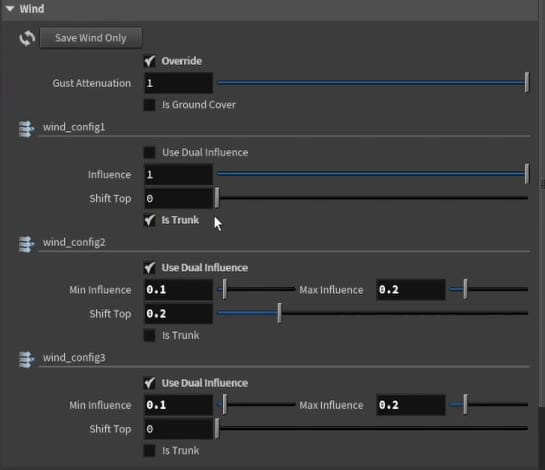
Each Wind Config node defines one wind response class: a set of stiffness and responsiveness values that control how bones at a particular depth react to wind. Chain multiple Wind Configs to build up layered motion: a stiff trunk, moderately flexible mid-branches, highly responsive leaf-bearing tips. Each node produces one wind class in the UE5 output, mapping directly to Unreal's wind animation system.

The first Wind Config typically treats the whole skeleton as one trunk layer. To add a layer for the branches, place a second Wind Config and give it a Carve Distance: by default carving works up from the trunk, but for foliage you want to carve down from the leaves. As you increase the distance, the assigned region spreads from the branch tips inward. Reduce the stiffness of that layer to get secondary shake on the branches. You can add more than two layers.

2. Previs in Houdini (optional)

Setting a Wind Config's display, or using the Wind Previs utility, plays back a cheap wind animation in the Houdini viewport. Useful for seeing where the boundaries between wind layers fall, but do not expect it to look one-for-one with what runs in Unreal: the engine-side wind animation is the source of truth for the final look. The colours show which layer covers which part of the tree.

3. Carry to Unreal

Export Unreal Nanite Assembly writes the Wind Config chain to wind.json alongside the USD. On the engine side, the wind.json describes which layers apply to which parts of the tree.

On the Unreal side, importing the wind data alone is not enough to see wind: it only drives Instance Skinned Meshes (created via PCG or Blueprints), not plain skeletal meshes, and the setup needs at least one instance plus a wind transform provider. The full engine-side procedure (Import Dynamic Wind Data, the Blueprint, simulation groups, and Gust Attenuation) is in Working with Assemblies in Unreal.

Iterating on wind. If you change only the wind (not the skeleton or geometry), you can re-export and re-apply the new wind.json to the existing imported tree. If you change the skeleton or geometry, re-importing over the same asset does not reliably pick up the changes; version the tree (export under a new name) instead. Renaming also breaks material paths, so re-run Auto Fill Materials before saving.

Driving your own solver from the rig

If your destination is Houdini rather than Unreal, you can drive Vellum or another Houdini solver from the same rigged skeleton that the Unreal export uses. This works today; it isn't a packaged Natsura wind tool, but the substrate (the rigged tree) is there.

Roadmap

The current wind story is intentionally Unreal-bound because the Nanite Skeletal Assembly route landed first. Planned beyond this:

  • VAT wind for traditional pipelines.
  • Pivot-Painter-style setups.
  • Full in-Houdini wind tools.
  • Other game engines beyond Unreal.

None of those ship today.

Tip

If your destination is Unreal, set up your wind layers with Wind Config and let the Unreal export carry them across. If you are staying in Houdini, drive your own solver off the rigged skeleton.