Export Unreal Nanite Assembly
Export Unreal Nanite Assembly sends one tree, or a whole library of trees, to Unreal as Nanite Skeletal Assemblies. Each tree arrives rigged, skinned and with its instances intact, along with a wind file built from your Wind Config layers.
This page covers the node. For the whole route, including importing, materials and wind on the Unreal side, see Nanite Skeletal Assemblies.
Input
Wire the Simulate, or the last Wind Config after it, into the first input. One wire carries the tree and its rig. Run Simplify Tree Rig and Skin and set up your Wind Config layers before the export.
The input has to come from a Simulate, because that is where the rig and skin weights are made. Anything else shows the Missing "BoneCapture" warning on the node.
On the node
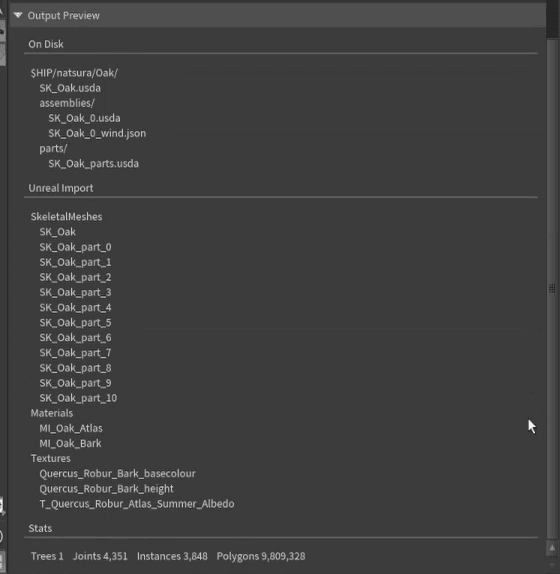
The node shows the export's name under it in the network. Output Preview lists the root file, the files on disk, every asset Unreal will create, and the tree, joint, instance and polygon counts. For more detail on a tree, put an Assembly Inspect anywhere upstream.
Export (Solaris)
Press Export (Solaris) to reach SOP Create Nanite Assembly, the node in Solaris that writes the files. It reads the tree, skeleton and wind layers from the export node, so change the geometry or rig upstream in SOPs. Its Help button opens a guide to every setting, and Return to Editing (SOPs) takes you back.
Mode is Simplified by default, which shows what every export needs; Advanced shows the rest. A setting you change stays visible in Simplified.
Give each export its own Name, or assets will collide in Unreal. A new node is named batch, and Save to Disk warns until you change it. Turn on Version, under Advanced, so a new export never overwrites the last. Prefix and Suffix are optional and off by default; asset and file names only start with SK_ when Prefix is on.
Set Format to .usd. The export node can start on .usda, the text version, which is heavier and slower to import.
Parts get generated names by default (Piece Names on From Attribute). Set Piece Names to Set Name for readable ones.
Each material shows how many parts use it, and in Advanced which textures it reads and a Mode for how it reaches Unreal. See Materials.
The Wind section has one row per Wind Config layer. In Advanced, each row shows what Unreal receives, and Override sends your own values instead. See Wind for Unreal.
Save to Disk checks the export first. Anything that would break the import stops the save and names the joint or part at fault. Smaller things, like a default name or a missing texture, ask before saving anyway. The button beside it opens the export folder.
Save Wind Only rewrites the wind files without touching the USD, for when only the wind has changed.
Each export writes its own folder, named from Name and Version. What gets written lists what is in it, and Limits how big an export can get.
Status
Extra UV sets and vertex colours aren't exported yet, and changing Name or Version is slow on big trees.
If the result in Unreal is wrong, see Nanite Troubleshooting.
Effector Template
Effector Template adds an effector stack, like the one on a Grow, to an HDA you build. Hidden from the Tab menu.
Create Graft Mesh
Create Graft Mesh turns an imported scan into the mesh procedural growth attaches to: it remeshes the scan, rounds off its open ends and thins the polygons towards them.